Posts Tagged byot
Coaching BYOT in the Classroom
Posted by BYOT Network in BYOT Strategies on April 9, 2012
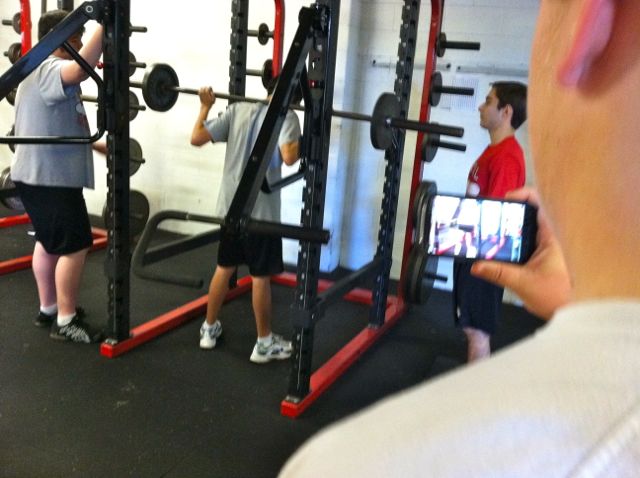
Students create videos to assess appropriate form and their use of the weight equipment.
In a recent tour of a high school implementing Bring Your Own Technology (BYOT), I was somewhat surprised to learn that some of the early adopters of BYOT in that school were the coaches in the PE department rather than in the academic areas. After reading a recent post in Edutopia entitled Telling Isn’t Teaching: The Fine Art of Coaching, by Dr. Richard Curwin, I realized that the successful implementation of BYOT by coaches makes a lot of sense.
According to Dr. Curwin, coaches can help students develop new abilities through repetition. With consistent practice, students learn how to transfer skills into automatic behaviors and habits. Coaches guide students into exploring their various alternative responsible choices and to carry them out successfully.
Coaching and BYOT
Likewise, in the BYOT classroom, students need their teachers to become good coaches to guide them in learning how to use their personal technology devices appropriately and responsibly. Students have traditionally used their technology for personal reasons, such as communicating with friends, listening to music, watching videos, and playing games, but the shift into using their devices for learning academic content is often an unfamiliar experience. Furthermore, instead of solely consuming media, the ultimate goal of BYOT is to provide students with the means to become producers of original content that encompasses their personal interests as well as academic information. Practice in these types of activities can help to create new automatic uses of their own technology.
Steps for Coaching in the BYOT Classroom
Teachers can try employing the following strategies, as they become coaches within their BYOT classroom:
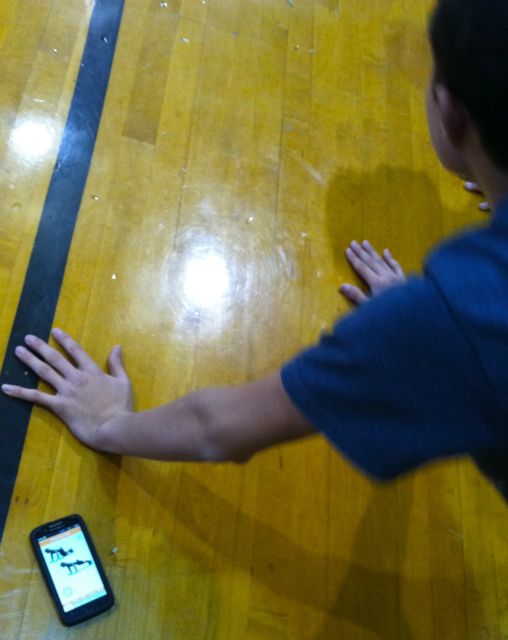
A student models his exercises with the use of an app on his smartphone.
- Provide students with ample time for practicing new skills with their own technology. Remember that although they know how to use their devices, they are now being expected to use them in new ways. It takes practice time to make learned behaviors part of a routine.
- Personalize the help you give students based on their personal needs, interests, and abilities. Good coaches observe their students and understand how to motivate each one individually. Encouraging differentiation of processes and products helps in the personalization of the learning experience.
- See mistakes as opportunities to learn new skills and strategies. Mistakes can be helpful to highlight where additional coaching is needed. When students feel that their coaches will be understanding and will offer guidance as necessary, then a sense of trust develops.
- Model appropriate behaviors. Coaches are also learners. They need to know how to find answers, and this can happen by asking open-ended questions and utilizing technology as well as the students as resources of information.
- Have high expectations for the success of all students. Students can sense when their coaches have faith in their ultimate success and will strive to achieve to that level.
From Banning to Coaching…

Students learn new uses for their devices.
Although teachers may tell students how they should use or behave with their devices, responsible use will not be actualized without practice. Dr. Curwin suggested that the coaching to adopt new behaviors should begin in kindergarten and continue throughout high school. BYOT should also begin as soon as students have their own personal devices and continue throughout their schooling. This is one of the biggest benefits of BYOT. When personal technology devices were banned from schools, students often had to learn for themselves the appropriate use of their devices, often with dire consequences. Now, that they are encouraged to bring their own technology tools to school, they can be coached into ways of using their devices that can transfer into enduring habits.
5 Ways to Learn with a Nintendo DSi
Posted by BYOT Network in BYOT Strategies on February 15, 2012
Although I continue to see additional iOS devices, iPods and iPads, in the hands of students in the elementary grades, one of the most popular technology devices continues to be the Nintendo DS and DSi. In fact, all Nintendo DS models combined have made it the best selling handheld game console. 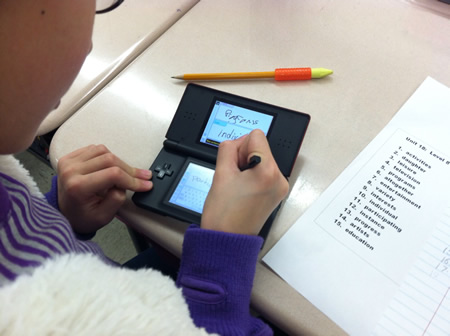 These handhelds are often a child’s first foray into personal technology, and they can be utilized effectively as learning tools within the BYOT classroom. To learn more about these devices, I asked the experts – a group of fourth grade students!
There are relatively few educational games for the Nintendo DS and DSi compared to the overall inventory of available games. However, the real benefits of the Nintendo DS and DSi are the free applications within these handheld devices. The major difference between the Nintendo DS and DSi is that the DSi has the capability to access the Internet, but even without accessing the Internet, the Nintendo DSi offers some applications that can be used by creative teachers and students to facilitate learning.
1. Pictochat – With Pictochat, students can communicate with 15 other users over a distance of about 65 feet by sending each other pictures or words over a wireless connection. Students can ask each other questions about concepts they are studying, such as math problems and possible solutions, and practice writing complete sentences and spelling words. This communication could be the beginning of understanding appropriate netiquette within the safety of the classroom learning community.
2. Clock – With the clock tool, students could monitor how long they work on tasks in the classroom and set an alarm when they need to move on to the next activity. This practice could help them develop more self-regulation as they monitor their classwork.
3. FlipNote Studio – FlipNote Studio is used to design animations. Some classroom activities could be to animate simple machines, steps in a process, or mathematical problem-solving. Students can add sounds to their animations including recording their voices. Another feature of FlipNote Studio is called Light Box, an onion skin effect that is included with the animations so students can perfect their illustrations. There is also a Copy tool so that students don’t have to keep drawing the same picture. Students’ animations can then be saved as animated gifs onto an SD card or shared wirelessly with other students’ DSis.
4. DSi Camera – All DSis have a camera tool, which has several uses within the classroom. The photos that students take can be saved to the device’s internal memory or to an SD card. One fourth grade student took weekly photographs with her DSi of caterpillars that she had at home to document their metamorphosis into butterflies. She uploaded these photos from the SD card into a class blog and wrote a description of each stage to share with the class. Since the DSi’s are able to connect to each other, students are able to share their photos with each other without the use of email.
There are different lens tools that students can use to edit their photos. With the Graffiti Lens, students can draw on their pictures. So, in the classroom, students could take pictures of a plant and label all of the parts. With the Mirror Lens, students can learn about symmetry by copying and duplicating aspects of their photos.
Other types of effects can be added to faces in students’ photos. This can be used for inspiring characters for creative writing. Students can also add frames to their photos with an area for adding text. These photos could be saved to an SD card and loaded onto a computer for class projects.
5. DSi Sound – Students can record up to 10 seconds of sound on a DSi. First, they can record their voices and sound waves illustrate the pitch of their voices so students can understand how sound travels in waves. Students can record themselves reading and can slow down and speed up their tempo. They can test their ability to read with expression or to answer questions in a recording. Then they can edit these sounds with different effects. They can even record their own sound effects to add to their Flipnote Studio animations.
A final note…The ultimate goal in the BYOT classroom is to transform learning experiences for students. Students are empowered when they use their personal technology devices in new ways to support their learning. As you encourage the use of Nintendo DSis in your classroom to promote collaboration and a sense of community, remember that many parents have not seen their children using their devices in the ways listed above. Be willing to learn alongside your students to discover potential uses for the DSis in instruction. After all, they are the experts!
A BYOT Intro
Posted by BYOT Network in BYOT Strategies on May 11, 2011
For two years, my school district, Forsyth County Schools, has been officially implementing a Bring Your Own Technology (BYOT) initiative. I say officially because we all know that students have been bringing their own technology devices to school without specific permission for a long time! For the last two years, however, we have encouraged students to use their technology tools to help facilitate their learning experiences within the classroom and beyond school. After 20+ years of teaching, BYOT is one of the most effective innovations that I have utilized with teachers and students to positively transform teaching and learning.

Engaging Students with BYOT!
Students are now bringing a variety of personal devices to school each day to benefit their learning, but of course, not every student has a device. However, we are better able to utilize our school-owned desktops and laptops with students who need them. Additionally, BYOT does not mean that everyone is constantly using a technology tool; rather, students have greater access to technology tools, both personal and school devices, to use them, as needed. The different devices within the classroom provide greater opportunities for differentiation of instruction as the teacher makes the pedagogical shift to guiding learning rather than directing it.
Some of the devices that students are bringing to school include Nintendo DSi’s, iPod Touches, Cellphones, Smartphones, iPads, netbooks, laptops, and many others. This sounds like a lot of technology for the teacher to know how to use; however, the beauty of BYOT is that the students are knowledgeable about the technical aspects of working with their devices, and the teacher can focus on the learning and content rather than the technology.
The implementation of student-owned devices into the design of instruction has led to improved student and teacher collaboration in the process of learning. Dynamic student networks have begun to develop, and the students have become more self-directed and motivated in their academic activities. Understanding and advancing these networks are two of the goals of the BYOT Network blog in addition to sharing resources for promoting BYOT initiatives. By inspiring students to employ their own technology devices in school, educators can assist students in making meaningful, personal connections to their learning.


 BYOT Network