Archive for category BYOT Strategies
The First Five Days of School with BYOT
Posted by BYOT Network in BYOT Strategies, BYOT Vision on July 25, 2012
 I recently read an article by Dennis Pierce in eSchool News that discussed Alan November’s “First Five Days” project. November announced this project at his Building Learning Communities conference in Boston in July 2012 with the goal being to make the most out of the beginning of the school year in order to set the stage for nurturing further success.
From my conversations with teachers around the country, many educators are returning to schools with new policies aimed at encouraging students to Bring Your Own Technology (BYOT) to facilitate learning experiences. In thinking about the first five days in a BYOT classroom, what kinds of things should happen to successfully begin this transformational implementation?
I brainstormed my own list and tried to organize it chronologically according to each of the five days. However, I again realized that in the BYOT classroom, many things have to happen just in time (or simultaneously), and a sequential list of orderly items was impossible (for me). As Anne Collier explained in her blog at NetFamilyNews.Org, all kinds of learning [happens] all at once with BYOT. Instead, I’ve enumerated a simple list of five strategies for the first five days of BYOT and provided links to additional resources whenever possible.
Construct a learning community. You will need an online space to house your learning community. Wenger, White, and Smith referred to this online space as a digital habitat, and the teacher becomes the steward or facilitator of that habitat. That space could be a blog, website, wiki, LMS, etc, and this is the environment where you and your students can learn more about each other, participate in on-going discussions, and practice digital age skills. As you decide what type of space you should use, think about the needs of your students. This may include the accessibility they have to various types of technologies; their ages, interests and capabilities; and your goals for interaction. For more information, review these strategies for designing an online learning community.
Discuss responsible use. Empower your students to talk about the appropriate ways to use their technology tools at home and school. Students need time to share their devices with each other and to demonstrate how they use them. They can also provide scenarios regarding technology use that illustrate the importance of using them responsibly. When is the right time to utilize technology tools, and when should they be put down in order to be “present in the moment” as suggested by Jen LaMaster in her blog of Ed Tech Reflections? Encourage your students to develop these group norms for behavior in your learning community along with your input, and provide them with multiple opportunities to practice and reflect on responsible use during the first five days of school.
Model your expectations. It isn’t sufficient to just say that you have high expectations for every student. Show the students that you trust them to do the right things with their technology devices. For example, every student can participate in a class wiki to develop guidelines for responsible use so that everyone contributes to the body of knowledge of the learning community. Students are actually smarter in the appropriate use of technology, than most people think (see here). A free class wiki can be organized in Wikispaces to ensure the input of all students.
Practice the 4 C’s of Digital Age Learning – Communication, Collaboration, Creativity, and Critical Thinking. Begin a week long project that supports inquiry and the use of the students’ technology devices. If some students do not bring technology devices, encourage collaboration through sharing and maximize the use of the school’s technology resources. Projects need to engage students in higher level thinking and authentic work. Bernajean Porter explained different uses of technology: Literacy, Adapting, and Transforming in her Grappling’s Technology and Learning Spectrum, and in the first five days, the students will have to participate in some literacy and adapting activities. However, the ultimate goal should be to achieve transforming uses of technology in that students become producers, rather than solely consumers in their learning, and the implementation of BYOT can lead to greater student agency and empowerment within the learning community.
Be patient. Understand that students will occasionally make mistakes with their technology devices, but these mistakes are essential during this learning process. Use these situations to reinforce the appropriate ways to use technology at school as well as to learn new technical skills. Although they may know how to use these for entertainment and communication, they don’t always know how to learn with them as members of a community. If you don’t know how to resolve a situation, be willing to learn alongside and from your student experts. Consistently challenge students to do their best work and look forward to an outstanding school year!
Can you think of some additional strategies for BYOT in the first five days of school?
What Happens When Technology Becomes Just Another Appliance?
Posted by BYOT Network in BYOT Strategies on July 13, 2012
Guest Post by Steve Allen Mashburn, ED.S.
Coordinator of Online Education
Students appreciate the convenience of online courses but when they are pressed to discuss the instructional aspects, few give virtual schooling a glowing review. Unfortunately, the growth of virtual education has been due to operational factors (reduce cost, scheduling conflicts, quick and dirty remediation, etc.) , rather than an inherent benefit of better instruction.
As I have seen online education develop (both locally and nationally), I have adjusted my thinking about the advantage of a Learning Management System (LMS).
I clearly see that there is a reason textbook publishers are turning to learning objects delivered through a Learning Management System – after all, the LMS was designed to digitized traditional face-to-face teaching and learning on the college level. The reason is that it is in the vested interest of the textbook publishers and other content providers to support this so-call transformation into 21st century learning. They hope the adaption of print materials into digital learning objects will be a windfall in terms of their investment. A lengthier “long-tail” to an intellectual property cannot be found; after all, when will an animated object showing the parts of speech go out of date? It has a longer shelf life than “Proud Mary.”
If you feel traditional education is effective, then all is well. You can march into the future confident that a technology band-aid closes the ever increasing gap between today’s student and their formal education.
However, I think (and I am supported by every major educational study of the last 50 years), that the infrastructure of school needs major surgery. Why, then, are we turning to the very people who made learning dull and boring for students for so many years?
Textbook publishers and their content and curriculum advisors know naught about engaging students. Film directors, musicians, comic book writers and electronic game developers do. These are the people that need to be developing our instructional delivery for the 21st century. We need creativity, not pedagogy, to reach the at-risk student (and in today’s climate, I think every student is at risk).
Online education, as it exist at this point in time, is nothing more than students completing a set of electronic worksheets. Despite this, students seem to be accepting, even pleased, with their online experience. But what happens when the novelty wears off. What happens when technology becomes just another appliance – like the stove or washer?
But the digital worksheet approach is not the only way. There is no technical reason why online education, through the use of a virtual world, cannot be based upon the principles of social constructivism (such as project-based learning with authentic connections, proximal development, spiral curriculum, scaffolding, and language acquisition).
The tools for creating a New Opportunity for Better Learning Environments (NOBLE) are here.
Virtual worlds now have the ability to quickly gamify content with quests, NPC (non-playing characters – or bots), role-plays, simulations, reenactments and 3-D modeling .
Check out – http://www.avatarclassroom.com/
Triple AAA Support for BYOT
Posted by BYOT Network in BYOT Strategies on July 2, 2012
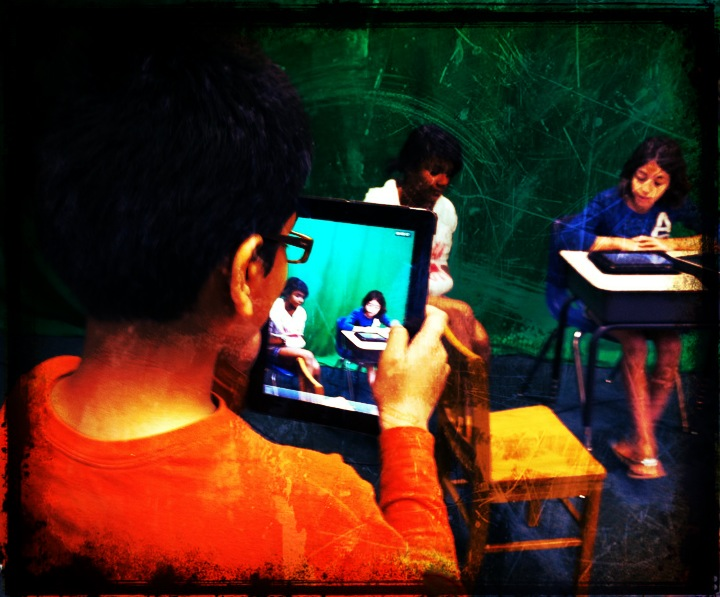 Effective supports are essential for scaffolding and sustaining a transformational implementation of BYOT. This transformation is the metamorphosis that classrooms undergo when students are encouraged to use their own technology tools to produce rather than just consume content. Similar to how car owners can subscribe to AAA services in case their vehicles break down or get a flat tire, there is also a triple AAA to facilitate learning with BYOT. The AAAs of BYOT include Agency, Affinity, and Authorship.
Agency
Having a sense of agency refers to students owning the work necessary within the community. Because they are personally invested in their own technology tools, they can develop new uses and strategies for learning with them that arise from collaborating with their classmates and their teachers. Since they have been utilizing those same devices at home for entertainment or communication, they are experts in those aspects of their technology, but they often need the guidance of others in their classroom in order to discover how to learn with them. All of these efforts, however, can empower students to make relevant personal connections to the content and to each other that extend beyond the school walls.
Affinity
The affinity of students for learning is revealed as they begin to exhibit a passion for the work. There is no single instructional method or assignment that encompasses the capability of every device or the interest of every student. When students use their own technology for learning, they are able to choose what aspects of a topic interest them and how they will show what they have learned. Of course, students are not accustomed to being able to make authentic choices within most school settings, but again, this is where the learning community can nurture affinity by recognizing and supporting the individual strengths and capabilities of its members. These talents often lead to students being branded by the rest of the group, and a student may become known as the one with the necessary qualifications and skills to complete a task, which can possibly lead to future job opportunities.
Authorship
As students began designing and creating original content with their devices and sharing these authentic products with others, they practice authorship. Using their technology tools for productive reasons provides students with new incentives for learning. Developing authorship within students ensures that their efforts are worthwhile. Through this perception of purpose within their work, students are able to achieve higher levels of retention as their projects possess meaning to the students themselves and to the larger learning community both within the school and globally. It is through authorship in BYOT that students practice the skills and confidence that are necessary for future academic and occupational successes.
Just in Time Learning for BYOT
Posted by BYOT Network in BYOT Strategies on June 11, 2012
 I have sometimes heard the misconception that before a school begins implementing Bring Your Own Technology (BYOT), students need to be trained in the acceptable use of technology that has been predetermined by the district; however, many of the digital age skills that students are developing as they use their devices at school occur just in time as they are needed in the course of the process of learning. Just in time learning entails that as a specialized strategy is necessary to solve a problem or share a solution, then that skill is learned and utilized in a relevant way within the context of the work. There are several just in time skills that students begin to acquire within the BYOT classroom.
Just in Time Digital Citizenship
We have all heard of students making mistakes with technology or using it inappropriately, often with devastating consequences. Many of these issues occur because students are self-taught or peer-taught in how they should use their devices without the just in time guidance of a teacher. When students are empowered to bring their personal technology devices to school to assume more control of their learning, they can be coached in responsible ways to use technology. Students in the BYOT classroom, have the advantage of learning how to use their devices for instructional purposes with the facilitation of their teachers. Students continually practice and refine digital citizenship in the BYOT classroom as they learn with each other through the use of the same technology devices that they use at home. Skills in netiquette, the appropriate ways to communicate with others online, as well as strategies for ensuring Internet safety, can be encouraged by the teacher within the BYOT learning community.
Just in Time Technical Troubleshooting
As devices and applications continue to change, there is no one consistent method for resolving technical issues. Technical troubleshooting and instruction must occur just in time in the BYOT classroom according to the pertinent needs of the situation. Teachers and students learn how to use new technology tools and programs while they are being utilized, and students often provide the technical training for their peers and their teachers. Since students are utilizing different devices for instruction, they will have to become proficient with the technical aspects of their own tools and usually become recognized for their particular areas of expertise. In this way, students and teachers can develop critical problem-solving strategies for working and learning within a digital world.
Just in Time Collaboration
Learning how to work with others to achieve a common purpose is essential to the BYOT classroom because students are bringing different devices to school, and those devices have different capabilities. The students also possess different knowledge, abilities, and interests, therefore, they have to pool their resources and intellect and negotiate responsibilities for the learning. Groups need to be dynamic and fluid as students work together and with their teacher to share information and make decisions. Many Web 2.0 sites can be used to develop online collaborative spaces, including Edmodo and Wikispaces. Just in time collaboration can occur synchronously or asynchronously and capitalizes on the potential strengths of everyone in the learning community.
Just in Time Critical Thinking
Critical thinking with BYOT involves being able to distinguish among conflicting information and facts as students conduct research with their personal devices. Recognizing propaganda and determining the accuracy of content are other essential critical thinking abilities required by the digital age. Students need to develop the capacity to use reason as they formulate opinions based on what they already know and on what they have learned from their classmates and in online searches. Students learning how to make these decisions just in time can be nurtured by the classroom teacher through modeling, practicing, reflecting, and questioning. A great tool for posing questions to students is Socrative. It works across multiple devices and incorporates various types of questions, and teachers can easily create follow up questions to responses that students have texted and shared with the rest of the class.
Just in Time Communication
In the traditional classroom, communication is often one-way – directed from the teacher and toward the student. In the BYOT classroom, there is a potential shift in communication as students use their devices to discuss content they are learning with others, set goals for themselves, and share new concepts. This communication happens just in time as the students are encouraged to communicate, whenever and wherever, as a function and expression of learning. The lines of communication are now multi-directional and extend beyond the classroom as students can web conference through Skype with other students in classrooms around the globe. They can instantaneously publish their ideas by blogging using Edublogs or through other blogging tools. Blogs can become a lasting portfolio of student work, and this process of authorship helps students to develop an authentic and beneficial digital footprint.
Just in Time Creativity
With the abundance of free and inexpensive applications for mobile devices, students are able to develop new skills in creativity. In the BYOT classroom, teachers can help foster creativity as students utilize their personal technology tools to invent and design original products. These inventions are often constructed just in time as solutions to problems or for students to illustrate what they have learned in imaginative new ways. In this manner, students aspire to become producers of content that they find relevant rather than solely being consumers of static information that has been predetermined as meaningful for students. With netbooks and laptops, students can download the free, open source, program Audacity to develop podcasts and recordings, or they can record straight to their handheld devices. Students can also use the camera tools on their devices to take photographs and easily turn these photos into new creations with the use of iPhoneography apps (my favorite is Pixlr-o-matic). VoiceThread is a web tool (with an app for mobile devices) that can enable multiple users to upload their original photos and comment on them collaboratively.
One more note… Just in Time
By the way, just in time professional learning opportunities also emerge for teachers in the BYOT classroom as they learn alongside their students and discover new interests, skills, and strengths in the use of personal technology for instruction.
Teaching the 4 C’s in BYOT
Posted by BYOT Network in BYOT Strategies on April 17, 2012
The Partnership for 21st Century Skills has developed a Framework for 21st Century Learning that identifies key learning and innovation skills, otherwise known as the 4 C’s: Creativity, Critical Thinking, Communication, and Collaboration. In the Bring Your Own Technology (BYOT) classroom, facilitating the 4 C’s becomes a logical extension of classroom instruction as students are connected to their learning and each other with their personal technology devices. With their own tools, students are able to practice and develop the 4 C’s as the teacher coaches, scaffolds, and models the learning. Of course, the students are the experts in their own devices, but the teacher has to create an environment that is conducive of exploration and inquiry so that students have the opportunity to learn how to learn with their technology. One way the teacher can encourage this type of environment is by learning alongside the students.
 Another strategy for implementing the 4 C’s within instruction is to promote them with the use of web tools and project-based learning. Although there is some overlap among the 4 C’s depending on how the tools are being used, I have provided some specific examples below:
Creativity – VoiceThread
A VoiceThread is an online slide show that enables students to upload and present images, documents, and videos and then share comments by writing or recording messages. They can also draw on the slides in order to annotate them during the presentation. Although VoiceThread is a great tool for supporting all of the 4 C’s, it can encourage creative expression with the students’ devices. Students can take their own photos and create presentations to demonstrate what they have learned, and the other students can provide creative comments. For example, in a study of similes (comparisons using like or as), a student can take a photo of an object with an iPod Touch and optimize it in a free photo app (one of my personal favorites is Pixlr-o-matic). The student then saves the photo and uploads it into VoiceThread. The other students can then provide interesting similies in their responses that involve the object in the photo. There is an app for VoiceThread that can be downloaded on the iTunes store for iPods and iPads, or VoiceThreads can be created online on Macs or PCs.
Critical thinking – Socrative
 Socrative is a web-based student response system that enables teachers to ask multiple choice, true/false, or short answer questions that students answer on their own devices. Teachers can also create and save quizzes ahead of time for students to complete, or they can begin ad-hoc sessions during class discussions with students. One aspect of Socrative that promotes critical thinking is that after asking an open-ended short answer question, the teacher can easily choose to have student vote on their answers. Teachers can also have students participate in an activity in Socrative called Space Race in which students can compete in random or assigned teams to complete a teacher-made quiz and be the first to get their team’s rocket to the finish line. I have seen this activity increase collaboration even in a high school AP Calculus class as the students worked in groups to solve problems and answer the questions. It works effectively even if every student does not have a device because the students can take share a device to answer questions and the new concepts are more likely to be retained as the students learn them in groups. The short answer option can be useful for the students to text in their own questions, and the teacher can then pose these questions back to the class or use them in a future quiz. Socrative also provides a preset Ticket Out the Door to assess student understanding of the learned content. There is a teacher app for Socrative (iOS, Android) as well as a student app (iOS, Android), so teachers are able to conduct the session from their smartphones or laptops, and students can participate via smartphones, laptops, or desktops.
Communication – Edublogs
With Edublogs, teachers and students can develop blogs for education that help to provide opportunities for communication in the classroom and in a global community. When students have their own blogs, they are able to publish the results of their project-based learning and collaboration and share what they have accomplished with others. Writing becomes more authentic as students have a purpose for their writing assignments, and students are able to customize their blogs according to their personal learning interests and styles. Although a blog is useful for publishing creative writing, it can also be used to communicate technical concepts like the steps in a scientific process accompanied with photos of the activity. Edublogs also publishes an annual list of the best blogs in education as well as additional web tools and apps on The Edublog Awards Blog. This list can be a useful resource for teachers and students as they begin developing their blogs. A teacher can sign up each student in the class for a blog, even in elementary grades, because an email address is not required. There is no app for Edublogs, but blogs can be edited through the Internet browser on smartphones, tablets, netbooks, and laptops.
Collaboration – Wikispaces
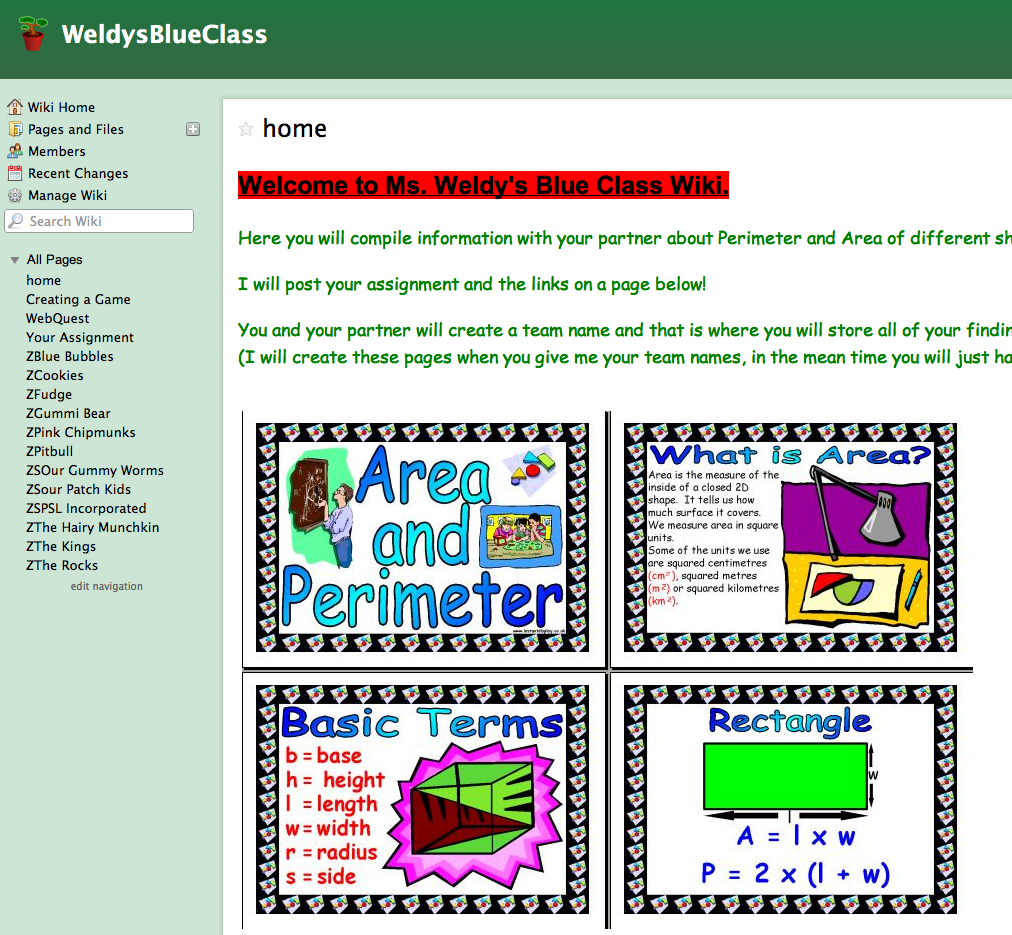 A wiki is a collaborative space for teachers and students to construct their learning experiences together. Teachers can develop class wikis in Wikispaces and easily upload all of their students, even if they do not have email addresses. In the wiki, the teacher and students can encourage a sense of community in the classroom by sharing files and creating content. As the students edit their work within the wiki, the teacher can track who made all of the changes to determine student participation. Like a blog, a wiki makes a good launchpad for encouraging BYOT. Since the students are working independently or in small groups, the wiki gives them a place to continue their projects or assignments while the teacher is learning alongside and coaching other students in the class. One example of how a wiki was used in a middle school math classroom, is that the teacher divided the students into groups to explain particular problem solving strategies and mathematical concepts. In this manner, the students in the class actually produced their own math “textbook” as an on-going project that they were able to use as a resource. Although, there is no app for Wikispaces, the students are able to edit text on the browser of their handheld devices, and they are able to use tablets, laptops, and desktops to complete all of their other editing in the wiki.
Some final thoughts…
The above resources are currently free, at least for individual teacher accounts, or a district may choose to subscribe to them in order to receive analytics or more customization. Their use in the BYOT classroom can be a good way for teachers to begin implementing BYOT and encouraging students to bring their own technology tools to school to facilitate their learning.
What other tools and strategies can be used to promote the 4 C’s in today’s digital age classrooms?
Coaching BYOT in the Classroom
Posted by BYOT Network in BYOT Strategies on April 9, 2012
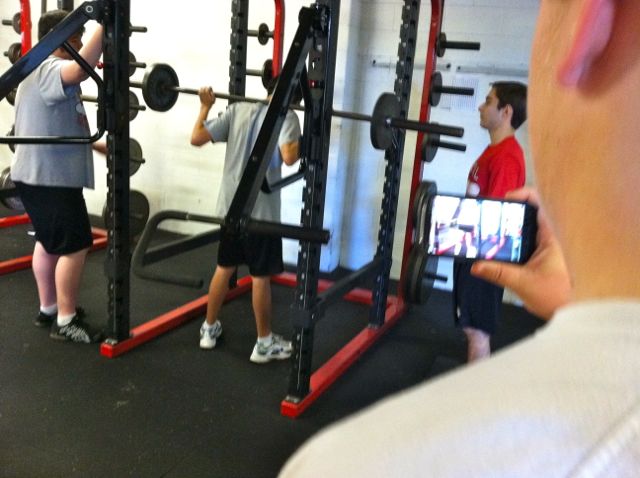
Students create videos to assess appropriate form and their use of the weight equipment.
In a recent tour of a high school implementing Bring Your Own Technology (BYOT), I was somewhat surprised to learn that some of the early adopters of BYOT in that school were the coaches in the PE department rather than in the academic areas. After reading a recent post in Edutopia entitled Telling Isn’t Teaching: The Fine Art of Coaching, by Dr. Richard Curwin, I realized that the successful implementation of BYOT by coaches makes a lot of sense.
According to Dr. Curwin, coaches can help students develop new abilities through repetition. With consistent practice, students learn how to transfer skills into automatic behaviors and habits. Coaches guide students into exploring their various alternative responsible choices and to carry them out successfully.
Coaching and BYOT
Likewise, in the BYOT classroom, students need their teachers to become good coaches to guide them in learning how to use their personal technology devices appropriately and responsibly. Students have traditionally used their technology for personal reasons, such as communicating with friends, listening to music, watching videos, and playing games, but the shift into using their devices for learning academic content is often an unfamiliar experience. Furthermore, instead of solely consuming media, the ultimate goal of BYOT is to provide students with the means to become producers of original content that encompasses their personal interests as well as academic information. Practice in these types of activities can help to create new automatic uses of their own technology.
Steps for Coaching in the BYOT Classroom
Teachers can try employing the following strategies, as they become coaches within their BYOT classroom:
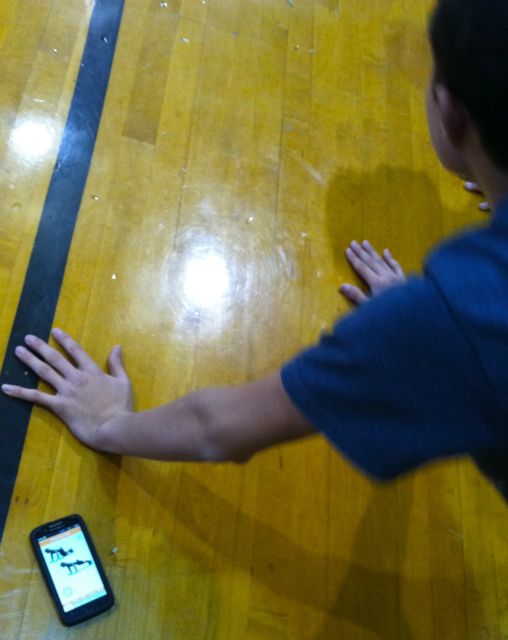
A student models his exercises with the use of an app on his smartphone.
- Provide students with ample time for practicing new skills with their own technology. Remember that although they know how to use their devices, they are now being expected to use them in new ways. It takes practice time to make learned behaviors part of a routine.
- Personalize the help you give students based on their personal needs, interests, and abilities. Good coaches observe their students and understand how to motivate each one individually. Encouraging differentiation of processes and products helps in the personalization of the learning experience.
- See mistakes as opportunities to learn new skills and strategies. Mistakes can be helpful to highlight where additional coaching is needed. When students feel that their coaches will be understanding and will offer guidance as necessary, then a sense of trust develops.
- Model appropriate behaviors. Coaches are also learners. They need to know how to find answers, and this can happen by asking open-ended questions and utilizing technology as well as the students as resources of information.
- Have high expectations for the success of all students. Students can sense when their coaches have faith in their ultimate success and will strive to achieve to that level.
From Banning to Coaching…

Students learn new uses for their devices.
Although teachers may tell students how they should use or behave with their devices, responsible use will not be actualized without practice. Dr. Curwin suggested that the coaching to adopt new behaviors should begin in kindergarten and continue throughout high school. BYOT should also begin as soon as students have their own personal devices and continue throughout their schooling. This is one of the biggest benefits of BYOT. When personal technology devices were banned from schools, students often had to learn for themselves the appropriate use of their devices, often with dire consequences. Now, that they are encouraged to bring their own technology tools to school, they can be coached into ways of using their devices that can transfer into enduring habits.
Levels of Use in BYOT – Transforming Learning Experiences
Posted by BYOT Network in BYOT Strategies on April 2, 2012
When students are encouraged to bring their own technology to school, this initiative has the potential to empower students and teachers in their learning experiences. We now have BYOT being implemented in all 35 schools in my district, and it is still gradually spreading from classroom to classroom. 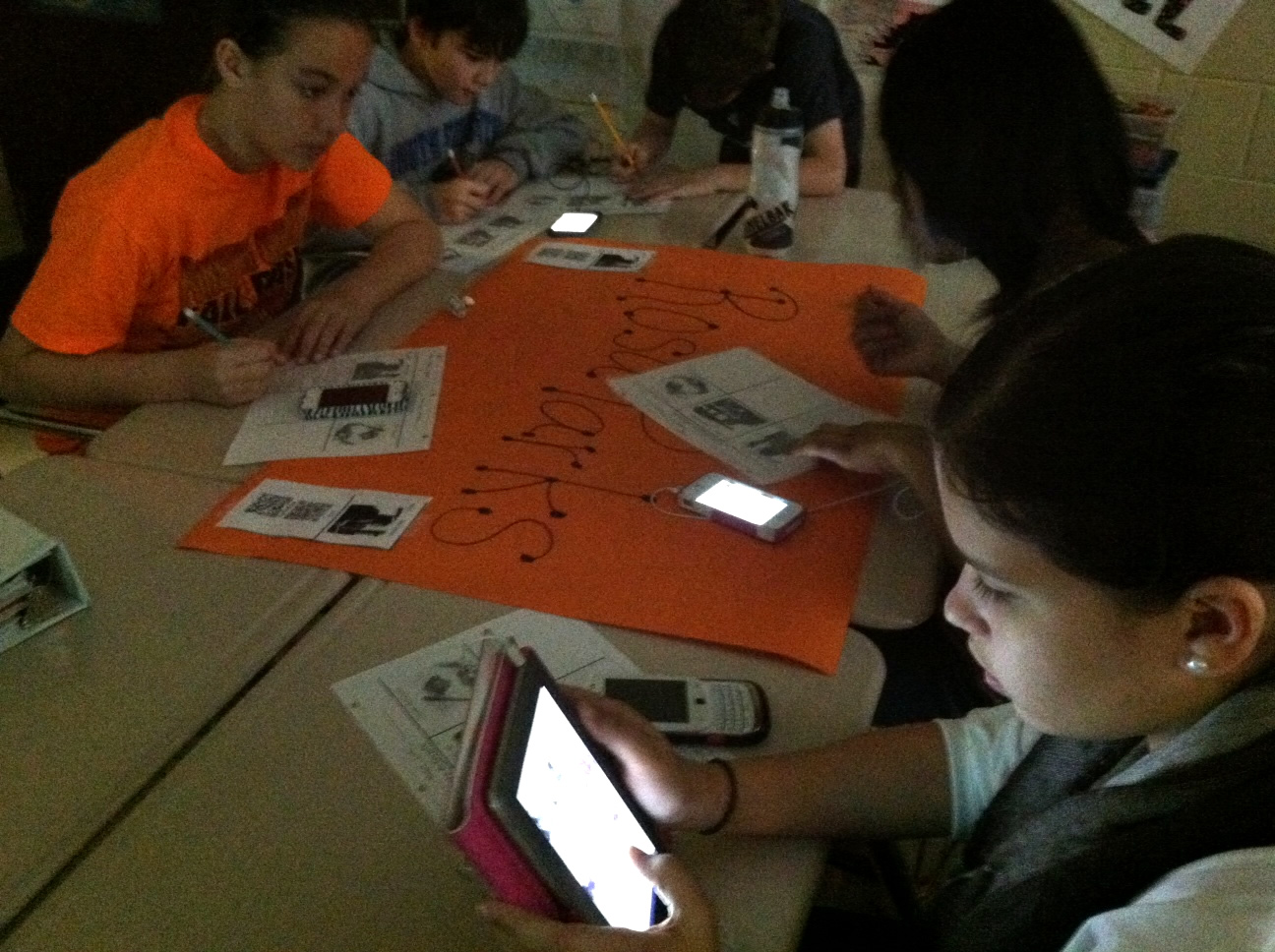 We have noticed varying levels of use of the technology devices that the students are bringing to school, yet our goal is to achieve the optimal potential of BYOT to impact student learning. To describe the use of instructional technology in our classrooms, we use Bernajean Porter’s Grappling’s Technology and Learning Spectrum to differentiate between Literacy, Adapting, and Transforming uses of technology. In fact, this spectrum has been incorporated into the classroom observation of our teachers to help focus on areas of strength and potential areas for future growth.
Here are some ways that this spectrum can translate into instructional activities of the BYOT classroom as well as some suggestions for encouraging higher levels of use.
Literacy Uses
Bernajean Porter describes Literacy Uses of technology as the focus on the technology itself rather than on the curriculum. When the students first bring their own technology into the classroom, they have to learn how to connect them to the districts wireless network. They are excited about the apps and capabilities of their devices, and they are eager to share and discuss them with each other. The students often have to help each other with using the technology within the infrastructure of the school district. This is part of the process of encouraging BYOT in the classroom, and the amount of time that it takes to progress through this level of use varies based on the experiences and abilities of the students. In my observations, I have seen this level of use quickly pass, and then the students look for some direction about new uses for their technology tools. The students are often not used to learning with their own devices. They may have used them for playing games, texting, and consuming content, but they need their teachers to facilitate some educational and productive uses.
A classroom can get stuck in the literacy level when BYOT is relegated to one day of the week or when it is seen as something extra to be used as a diversion or a reward in the classroom. To help BYOT progress to the next level of use, the teacher needs to brainstorm with the students how their devices can assist their learning on a regular basis in the classroom.
Adapting Uses
When students begin to use their technology tools to do the same types of assignments they completed without BYOT, then they are engaged in Adapting Uses of their devices. Some examples of adapting BYOT to the classroom can include the following: entering assignments on the calendar of a smartphone instead of writing them on an agenda; taking notes during a lecture with an app; using a word processor to complete writing assignments; making use of the calculator on a cell phone to finish a math worksheet; and researching facts on a topic. When a student logs into a website to play games with the sole purpose of improving their basic skills in grammar and math or even to watch instructional videos on a topic, they are also using their technology on the adapting level.
In typical 1 to 1 programs where every student has been provided with the same device, classrooms can easily get stuck in the adapting uses of technology. Instead of reading from a paper textbook, the students are sometimes given the assignment to read the digital textbook and then to enter their answers to questions at the end of the chapter on the device. Another example of an adapting use is when the teacher directs all of the students to complete the same project using the same software, and the end products all end up being basically the same. BYOT can help to encourage higher levels of use because assignments have to be more open-ended to account for the students’ differing devices. To move to the next level of use, the teacher has to provide flexibility for student choices and to be willing to learn alongside the students.
Transforming Uses
As teachers begin to empower students with the Transforming Uses of their technology devices, the tools seem to disappear in the classroom, and the focus becomes centered on the construction of new meanings. The teacher’s job shifts from teaching about technology or directing instruction into a more facilitative role of learning. The most important ability a teacher needs to possess in this BYOT classroom is knowing how to ask the right questions to help students collaborate in inquiry, to decide on the right tools, and to create original products that show what they have learned. The process of learning in this environment is as important as the end product, and the technology that is used is essential to the ultimate outcome of the learning experience. In addition to being consumers of content, the students now become producers of information to be presented in exciting new ways.
An example of a transforming use of technology in a high school classroom that I observed was that after reading Shakespeare’s Othello, the teacher had the students watch the modern movie adaptation. This would just be an adapting use of the technology; however, the experience became transforming as the students watched the movie and participated in a back channel discussion on their devices. They compared the movie to the original play via Skype. The teacher actively monitored the thread of the discussion on his own laptop and promoted further in-depth dialogue in the online chat by commenting and asking thought-provoking questions based on the students posts. In this instance, the activity could not have been completed without the use of the technology, and the discussion progressed to higher-levels of thinking.
The Next Steps…
When you begin your BYOT initiative, realize that teachers and students will naturally move back and forth among the above uses of their technology tools. If teachers, do not have a goal for BYOT or provide opportunities for students to own the learning, they will sometimes just stop bringing their devices to school. Explore ways to implement BYOT as a regular part of the class day, and be open to transforming learning.
Please share your ideas for additional transforming uses of BYOT…
5 Ways to Learn with a Nintendo DSi
Posted by BYOT Network in BYOT Strategies on February 15, 2012
Although I continue to see additional iOS devices, iPods and iPads, in the hands of students in the elementary grades, one of the most popular technology devices continues to be the Nintendo DS and DSi. In fact, all Nintendo DS models combined have made it the best selling handheld game console. 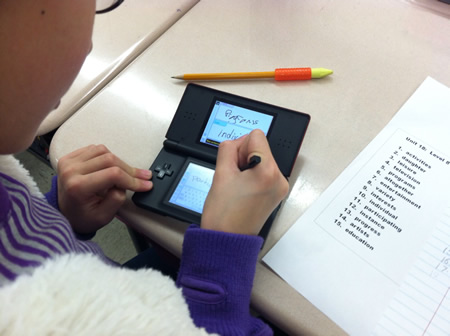 These handhelds are often a child’s first foray into personal technology, and they can be utilized effectively as learning tools within the BYOT classroom. To learn more about these devices, I asked the experts – a group of fourth grade students!
There are relatively few educational games for the Nintendo DS and DSi compared to the overall inventory of available games. However, the real benefits of the Nintendo DS and DSi are the free applications within these handheld devices. The major difference between the Nintendo DS and DSi is that the DSi has the capability to access the Internet, but even without accessing the Internet, the Nintendo DSi offers some applications that can be used by creative teachers and students to facilitate learning.
1. Pictochat – With Pictochat, students can communicate with 15 other users over a distance of about 65 feet by sending each other pictures or words over a wireless connection. Students can ask each other questions about concepts they are studying, such as math problems and possible solutions, and practice writing complete sentences and spelling words. This communication could be the beginning of understanding appropriate netiquette within the safety of the classroom learning community.
2. Clock – With the clock tool, students could monitor how long they work on tasks in the classroom and set an alarm when they need to move on to the next activity. This practice could help them develop more self-regulation as they monitor their classwork.
3. FlipNote Studio – FlipNote Studio is used to design animations. Some classroom activities could be to animate simple machines, steps in a process, or mathematical problem-solving. Students can add sounds to their animations including recording their voices. Another feature of FlipNote Studio is called Light Box, an onion skin effect that is included with the animations so students can perfect their illustrations. There is also a Copy tool so that students don’t have to keep drawing the same picture. Students’ animations can then be saved as animated gifs onto an SD card or shared wirelessly with other students’ DSis.
4. DSi Camera – All DSis have a camera tool, which has several uses within the classroom. The photos that students take can be saved to the device’s internal memory or to an SD card. One fourth grade student took weekly photographs with her DSi of caterpillars that she had at home to document their metamorphosis into butterflies. She uploaded these photos from the SD card into a class blog and wrote a description of each stage to share with the class. Since the DSi’s are able to connect to each other, students are able to share their photos with each other without the use of email.
There are different lens tools that students can use to edit their photos. With the Graffiti Lens, students can draw on their pictures. So, in the classroom, students could take pictures of a plant and label all of the parts. With the Mirror Lens, students can learn about symmetry by copying and duplicating aspects of their photos.
Other types of effects can be added to faces in students’ photos. This can be used for inspiring characters for creative writing. Students can also add frames to their photos with an area for adding text. These photos could be saved to an SD card and loaded onto a computer for class projects.
5. DSi Sound – Students can record up to 10 seconds of sound on a DSi. First, they can record their voices and sound waves illustrate the pitch of their voices so students can understand how sound travels in waves. Students can record themselves reading and can slow down and speed up their tempo. They can test their ability to read with expression or to answer questions in a recording. Then they can edit these sounds with different effects. They can even record their own sound effects to add to their Flipnote Studio animations.
A final note…The ultimate goal in the BYOT classroom is to transform learning experiences for students. Students are empowered when they use their personal technology devices in new ways to support their learning. As you encourage the use of Nintendo DSis in your classroom to promote collaboration and a sense of community, remember that many parents have not seen their children using their devices in the ways listed above. Be willing to learn alongside your students to discover potential uses for the DSis in instruction. After all, they are the experts!
10 Strategies for Designing an Online Learning Community
Posted by BYOT Network in BYOT Strategies on November 30, 2011
For many of us,  the teachers that we remember as being the most effective were those who had an innate understanding of how to help their students develop a sense of belonging in their classrooms while simultaneously maintaining high expectations for learning. I recently worked with a class of fourth grade students and their teacher for six weeks to design an online learning community that supported their face-to-face instructional activities. Based on our experiences, I compiled this list of ten strategies for developing online learning communities.
- Teach Netiquette at the Onset of the Implementation. Teachers and students have to negotiate and establish the rules of communication and etiquette that determine how an online learning community will function. As students become more comfortable communicating online, they are more likely to form a class community. With clear expectations about appropriate interaction, teachers can assist their students feel an acceptance that can motivate collaboration.
- Incorporate Time for Social Discourse and Conversation. One of our first online activities was to communicate through discussion forums. We quickly noted that the students had some initial difficulty participating in online discussions about academic content. However, when students described their Spring Break activities within an online discussion forum, they were able to relate and connect to each other’s posts in the discussion. According to Wenger, McDermott, & Snyder (2002), the sharing of common interests is necessary for operating within a community of practice, and it can lead to collaborative problem-solving and the development of shared understandings. By incorporating social discussions we were able to establish and nurture communication that led to greater personal understanding, acceptance, and tolerance and eventually supported academic discussions.
- Encourage Opportunities for Student Collaboration. As the students worked with each other to develop original projects and products related to their learning standards, they were able to learn more about the content. From the onset of this design of the online learning community, the students requested opportunities to interact with their peers in collaborative work. This entailed less risk because they were able to help each other while collectively developing an understanding about a topic. In turn, these shared learning experiences strengthened the bond among the students within the online learning environment.
- Provide the Students with Choices. The students expressed that they wanted to make choices about the types of activities that they had to complete online. They also wanted to decide how they should organize their collaborative work on their projects. When we developed activities for the students to complete online, we had to consider that new projects had to be explored, choices had to be incorporated into the design, and the students had to have opportunities for collaboration. Students were able to use multiple modalities to show what they had learned, and their choices provided additional opportunities for differentiation and success.
- Encourage Asynchronous Participation. A benefit of our online learning community was its asynchronous nature. The students communicated with each other, worked together on projects, or used links to locate information or complete activities. The asynchronous work had an influence on work within the face-to-face classroom in that the students had large portions of time dedicated to online collaboration. Whole group lessons became shorter and were usually reserved for providing directions or sharing strategies. Therefore, the students practiced and developed additional skills in self-directed learning and self-motivation.

- Have Teachers Model the Learning. The role of the teacher began to shift during the design of the online learning community. She began to assume a more facilitative and less directive role in instruction, as she became a participant in the learning process. She encouraged student interaction by asking questions and responding to their posts in online discussion. She was a mentor who suggested alternatives and possibilities, and she was an organizer who developed activities that engaged the students.
- Practice the Technical Skills. It was more complicated for the students to complete a new project or product when they had no previous experiences with the skills needed to complete that project. As the online learning community was continually modified and we introduced new opportunities for collaboration, we realized that the students needed practice time in order to utilize the new technology tools effectively.
- Utilize Student Experts. Online learning included some new challenges for the teacher and the students as the focus of instruction began to become more student-centered. The participants were learning technical skills related to learning online that involved using new tools including features of the learning management system (LMS) as well as personal technology devices that they used to access the online learning community. We utilized the students and their willingness to help each other as they learned how to work together. This sharing of expertise helps to shape the online community of practice (Wenger, White & Smith, 2009), and as the members support each other, they develop new social bonds to assist in further collaboration.
- Develop Understanding through Discussion Forums. An important feature of the online learning community that encouraged collaboration and interaction was the purposeful use of discussion. Through online discussion, the students expressed information that they wanted to know more about. As the students interacted and communicated with each other online, they were able to develop new understandings from these social practices.
- Explore Personal Interests. Throughout the implementation of the online learning community, the teacher and students began exploring and sharing their personal interests. This communication helped to build the community, as students made meaning from their personal experiences and shared them with others (Wenger et al., 2009). In addition, the students were enthusiastic about bringing their personal technology tools to school to facilitate their own styles of learning as they accessed the online learning environment. The students were so knowledgeable about their devices and so willing to share this understanding with others that this small Bring Your Own Technology (BYOT) initiative caused the interaction and collaboration among the participants in this community of practice to develop rapidly.

I am astounded by the determination of teachers and students to develop effective learning communities in spite of all of the obstacles that they face each day. The challenge of maintaining one’s individuality while effectively working as a member of a group is a reality of life and making that connection is a key ingredient of lifelong learning (Thomas & Brown, 2011). Collaborating and interacting within an online community facilitated support for learning; furthermore, these practices enabled the students to feel satisfaction as they explored their personal passions and interests.
References
Thomas, D. & Brown, J. (2011). An new culture of learning: Cultivating the imagination for a world of constant change. LaVergne, TN: Createspace.
Wenger, E, McDermott, R. & Snyder, W. (2002) Cultivating communities of practice: A guide to managing knowledge. Boston, MA: Harvard Business School Press.
Wenger, E., White, N. & Smith, J. D. (2009) Digital habitats: Stewarding technology for communities. Portland, OR: CPsquare.
A BYOT Intro
Posted by BYOT Network in BYOT Strategies on May 11, 2011
For two years, my school district, Forsyth County Schools, has been officially implementing a Bring Your Own Technology (BYOT) initiative. I say officially because we all know that students have been bringing their own technology devices to school without specific permission for a long time! For the last two years, however, we have encouraged students to use their technology tools to help facilitate their learning experiences within the classroom and beyond school. After 20+ years of teaching, BYOT is one of the most effective innovations that I have utilized with teachers and students to positively transform teaching and learning.

Engaging Students with BYOT!
Students are now bringing a variety of personal devices to school each day to benefit their learning, but of course, not every student has a device. However, we are better able to utilize our school-owned desktops and laptops with students who need them. Additionally, BYOT does not mean that everyone is constantly using a technology tool; rather, students have greater access to technology tools, both personal and school devices, to use them, as needed. The different devices within the classroom provide greater opportunities for differentiation of instruction as the teacher makes the pedagogical shift to guiding learning rather than directing it.
Some of the devices that students are bringing to school include Nintendo DSi’s, iPod Touches, Cellphones, Smartphones, iPads, netbooks, laptops, and many others. This sounds like a lot of technology for the teacher to know how to use; however, the beauty of BYOT is that the students are knowledgeable about the technical aspects of working with their devices, and the teacher can focus on the learning and content rather than the technology.
The implementation of student-owned devices into the design of instruction has led to improved student and teacher collaboration in the process of learning. Dynamic student networks have begun to develop, and the students have become more self-directed and motivated in their academic activities. Understanding and advancing these networks are two of the goals of the BYOT Network blog in addition to sharing resources for promoting BYOT initiatives. By inspiring students to employ their own technology devices in school, educators can assist students in making meaningful, personal connections to their learning.


 BYOT Network